Introducing Group SLAs
A powerful new approach to track and get notified about how your teams are performing relative to your agreed upon working commitments.

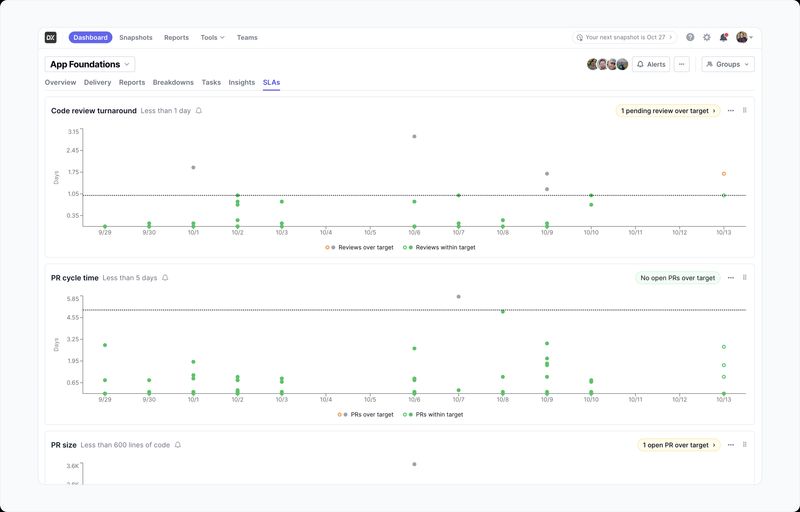
Today, we’re launching Group SLAs—a powerful new approach to track and get notified about how your teams are performing relative to your agreed upon working commitments. Group SLAs allow you to set up goals around specific performance metrics and see how your team is performing against them.
How Group SLAs work
Group SLAs track against various pull request and issue-related metrics, at the group level within DX. Once set up, an SLA will be accessible within the Dashboard with a visual overview of how your team is performing against the goal you’ve determined. You can also set up alerts to be sent to your group in Slack or Microsoft Teams—allowing you to get notified as a team directly where you work.
Why we built Group SLAs
Teams have frequently asked for more powerful functionality around tracking team-level goals and commitments in DX. With the launch of our new Dashboard, we gave teams a first-class home to land within DX and start their work. Now, Group SLAs build upon that work to deliver a powerful, customizable, and visual way to track your teams performance.
Getting started
If you previously used Frontline or have existing group-level alerts set up in the Dashboard, your existing settings will be automatically mapped to matching SLAs and no further action is needed. If you haven’t been taking advantage of these group-level features, you can enable SLAs from your group’s Dashboard within DX under the new “SLAs” tab.
To learn more about SLAs, contact your DX account rep or read our docs.