Introducing the AI-native DX CLI

Ana Wishnoff
Product manager
Many AI-powered developer tools today are noisy. They load unnecessary information into context, waste tokens and leave too much room for the model to improvise.
Today, we’re introducing the DX CLI to cut through that noise. It’s an AI-native command-line tool for interacting with the DX API from the terminal, so you can manage your Software Catalog, configure Scorecards, run Data Studio queries, perform snapshot analysis, and more — all from a developer’s terminal, an AI agent, or a CI pipeline. For agents, it progressively surfaces only the context needed to complete the task at hand, minimizing token usage and reducing errors.
The DX CLI is designed to be the primary interface for agents to interact with DX.
How it works
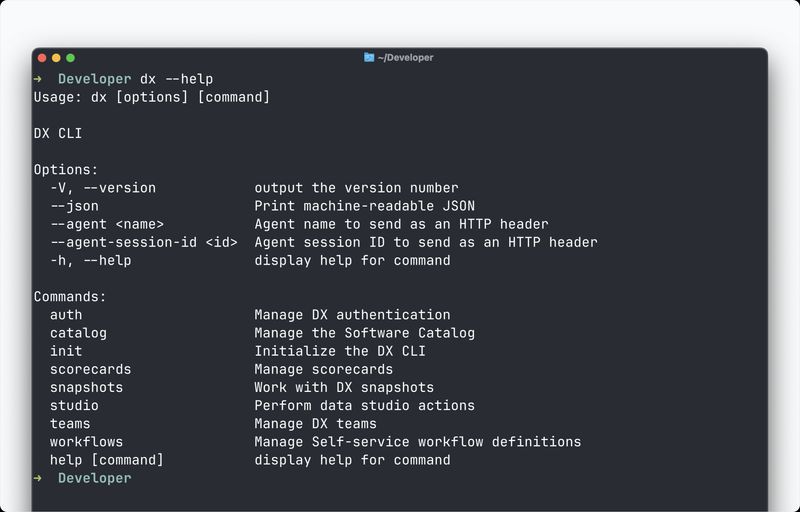
After installing the CLI, a number of commands are available that directly leverage DX Web APIs, including commands to:
- List inspect, create, update, upsert, and delete entities in the Software Catalog.
- Perform detailed snapshot analysis with access to scores, comments, and industry benchmarks
- Manage Scorecards as YAML, including listing, inspecting, creating, updating, and deleting.
- Run Data Studio SQL queries with parameterized variables and table, JSON, or CSV output (pictured below).
For the full list of commands, see our documentation.
Each command can also be called with a --json flag, prompting it to produce machine-readable output to work seamlessly with your agent workflow.
Using the CLI with an Agent
The DX CLI features a specialized agent skill that instructs agents on when and how to use the CLI. It also includes workflows for managing the software catalog, configuring scorecards, and analyzing snapshot results. Agents can leverage these tools to safely and decisively take action on your DX instance.
Getting started
The DX CLI can be installed via npm:
npm install -g @get-dx/cli
For detailed resources on how to leverage the DX CLI, see:
- The documentation for a full reference on available commands.
- The full video demo for a walkthrough of how to setup and use the CLI.
Availability
The DX CLI is currently in Beta. For support or issues with access, reach out to your account representative.