Meet the AI lifecycle impact report: Measure AI across every stage of the SDLC

Kali Watkins
Product Marketing
Is AI helping engineering teams move faster? More specifically, what parts of the SDLC is AI accelerating and where is it creating more friction?
To help answer these questions, we’ve launched the AI lifecycle impact report in DX: a new report that helps teams see where AI accelerates delivery and where new bottlenecks might be introduced.
The report connects AI adoption to software delivery outcomes. By breaking down the development lifecycle into distinct phases, teams can see where time is being spent, understand how that changes across different levels of AI usage, and identify opportunities to improve how work moves from planning to production.
How the report works
To get started, choose the AI usage groups you want to compare. For example, you could compare developers with moderate and heavy AI usage versus those with minimal or no AI usage. You can also filter the report by team, job level, tenure band, and other attributes to focus your analysis on specific groups of developers.
The report measures total lifecycle time and breaks it into four stages:
- Refinement: Time between issue creation and the first PR commit.
- Work: Time between the first and last PR commits.
- Review: Time between the first PR review and the last merged PR.
- Deployment: Time between the last merged PR and the last deployment.
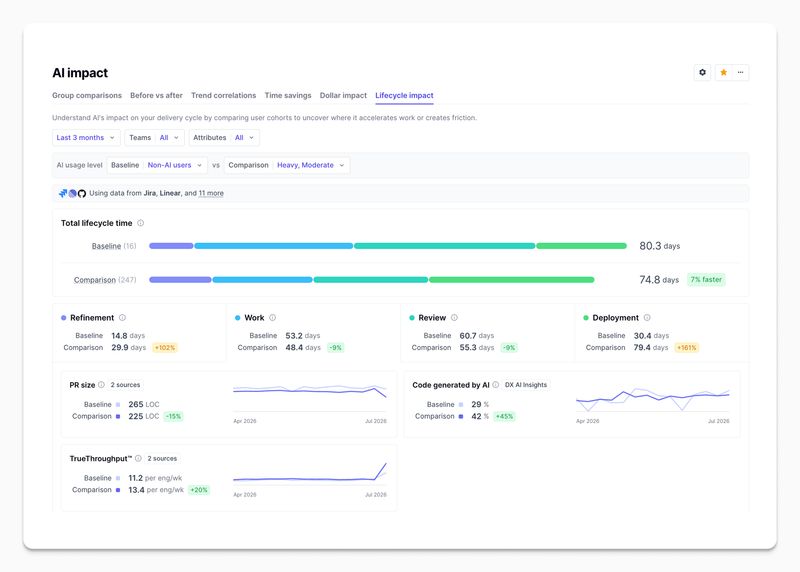
Select any stage to explore it in more detail. Each stage includes a set of supporting metrics that combine system and self-reported data, giving you a more complete picture of what’s happening during that part of the lifecycle. For example, the Refinement stage includes metrics such as issues created alongside developer feedback on planning processes and time lost to poor documentation. The Work stage includes metrics such as PR size, AI-generated code, and TrueThroughput, helping explain what is contributing to velocity increases or decreases in that stage.
Teams can use the report to:
-
See where time is spent and where bottlenecks exist. Break total lifecycle time into refinement, work, review, and deployment to understand where AI is accelerating delivery and where it may be introducing friction.
-
Identify opportunities to improve how work moves from planning to production. Pinpoint where work slows down across the lifecycle so you can remove friction and improve the flow of software delivery.
-
Drill into each stage to understand exactly where problems exist. Move from top-level insights (“The review stage is taking longer than expected”) to supporting metrics that show why problems exist and where improvements should be focused.
-
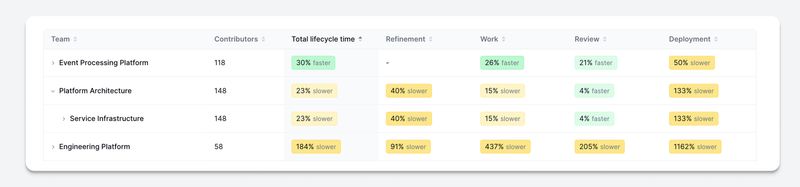
View a heatmap of lifecycle impact across teams to quickly identify where AI is creating the biggest gains, and where there’s the greatest opportunity to improve software delivery.
Getting started
The AI lifecycle impact report is now available in DX. If you’re a customer, contact your DX account representative or read our documentation to learn more. If you’re not yet a customer, request a personalized walkthrough of the report.